Image Splitter2.42
Publisher Description
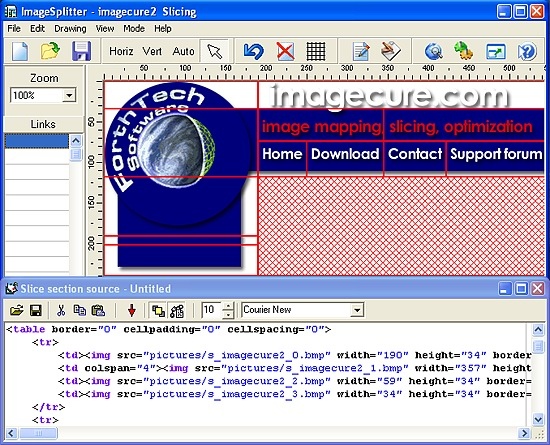
Speed up your Web site by splitting large images into pieces. Shrink your graphics size while increasing its quality. Make interactive image-based navigation faster and easier by hot-linking slices instead of using slower-loading static image maps. Image Splitter prepares your images for publishing on-line by slicing an image into rectangular pieces of arbitrary size.
Large pictures and big graphics take longer to fully load and display even if a visitor has a high-speed connection. Downloading the same file in several separate threads can greatly increase the loading speed, providing a better browsing experience to the visitors. Image Splitter optimizes your large images for loading as quickly as possible by cutting them into several smaller pieces. Publishing big pictures sliced into several smaller pieces makes your Web pages load much faster thanks to concurrent downloading.
Do you have large heavily compressed JPEG images? Avoid compression artifacts and increase visual quality while reducing the total size by splitting such images into pieces. Image Splitter automatically detects the compression methods that are suitable for each slice, varying image and compression parameters to achieve much higher compression levels while maintaining the visual quality of the original, non-compressed picture.
Designing image-based navigation or a menu? HTML image maps are yesterday's technology! Employing larger images that have to be reloaded in full on rollover is wasteful and slow. Image Splitter makes a perfect navigation structure completely automatically by generating arbitrary HTML tables with support for colspan and rowspan tags. Image Splitter makes rollovers easy to make and blazingly fast to load as only small image chunks are reloaded.
Have multiple images to cut? Image Splitter supports batch mode to automate the splitting.
Make your Web pages load faster and your Web design workflow easier with Image Splitter!
About Image Splitter
This Converters & Optimizers program is available in English. It was last updated on 29 September, 2026. Image Splitter is compatible with the following operating systems: Windows, Windows-mobile.
The company that develops Image Splitter is ForthTech Software. The latest version released by its developer is 2.42. This version was rated by 1 users of our site and has an average rating of 5.0.
The download we have available for Image Splitter has a file size of 1.0 MB. Just click the green Download button above to start the downloading process. The program is listed on our website since 2008-11-14 and was downloaded 1,151 times. We have already checked if the download link is safe, however for your own protection we recommend that you scan the downloaded software with your antivirus. Your antivirus may detect the Image Splitter as malware if the download link is broken.
How to install Image Splitter on your Windows device:
- Click on the Download button on our website. This will start the download from the website of the developer.
- Once the Image Splitter is downloaded click on it to start the setup process (assuming you are on a desktop computer).
- When the installation is finished you should be able to see and run the program.
Program Details
System requirements
Download information
Pricing
Version History
version 2.42
posted on 2008-11-14
- ability to replace edited image without resetting slice layout;
- rowspan/colspan tags support;
- new ability to merge and split slices;
- ability to move splitting lines;
- command line options removed owing to batch mode feature;
version 2.40
posted on 2005-12-20
- revised most of main functions (code generation, splitting, etc.);
- new ability to merge and split slices. Image Splitter now supports
rowspan/colspan tags. So you can create any possible slice layout;
- ability to move splitting lines;
- command line options removed owing to batch mode feature;
- optimized memory usage, so the program can process bigger images.
- undo now stores all slice layout changes;
- new .isp file format introduced. That file stores graphic data and
slice layout information;
- .isp extension is registered as Image Splitter file. So you can open
.isp files double clicking on them;
- being dropped on Image Splitter window, image files (.isp, .jpg, .gif,
.png, .bmp) are opened now by the program.
